Swiss QR bill
Swiss QR bills with the payment part added automatically
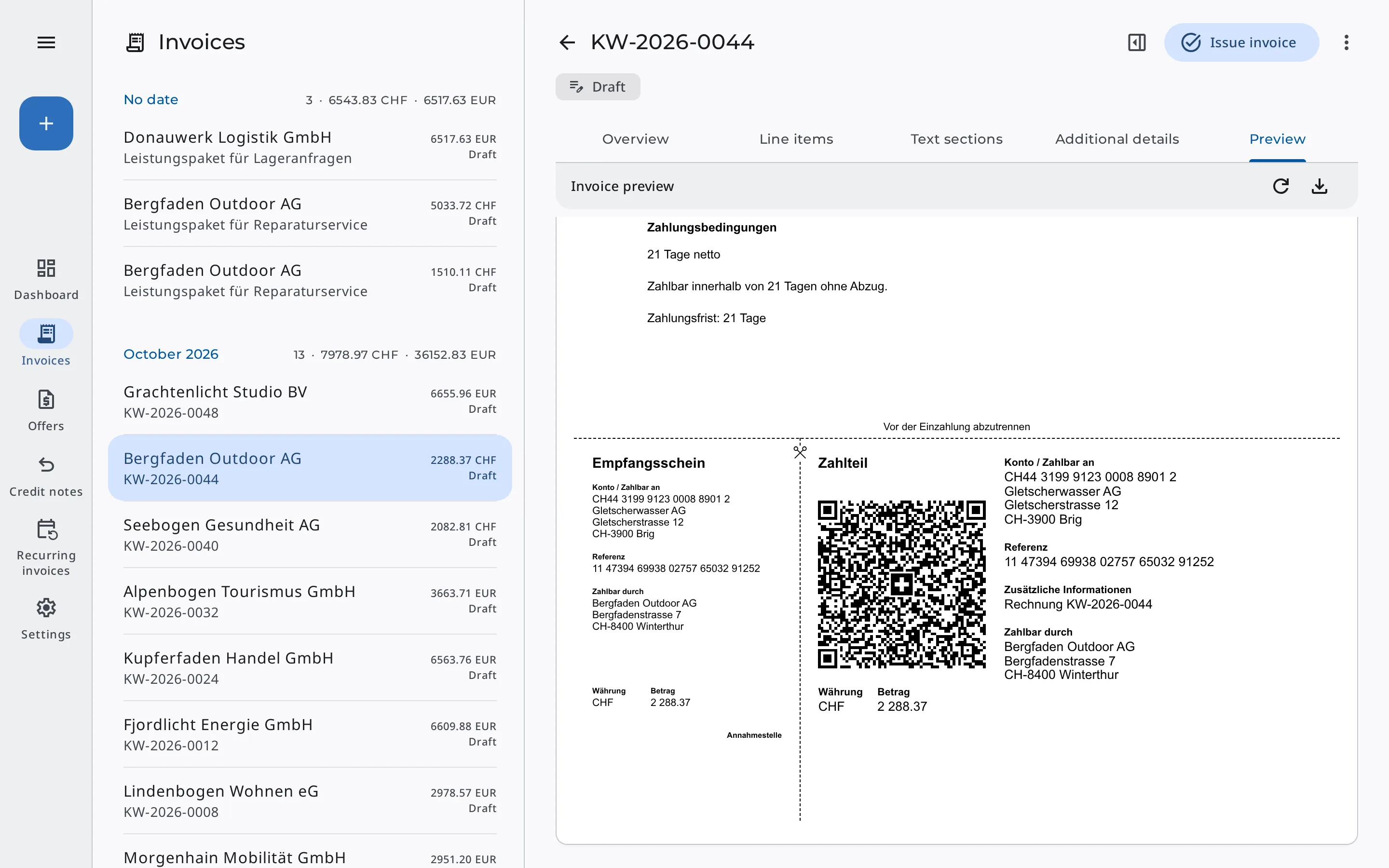
When you issue an invoice to a customer in Switzerland, Erdikon adds the receipt and payment part automatically, following the SIX guidelines. Your customers scan the QR code with their banking app instead of typing the IBAN and reference.
Free for up to two users. No credit card required.
QR-IBAN or regular IBAN
The type of QR bill depends on the payment details you select on the invoice.
With a QR-IBAN
With your bank's QR-IBAN, every invoice in Swiss francs gets its own QR reference. Erdikon generates it automatically, and it stays the same even if you change the invoice number or bank details.
With a regular IBAN
With an IBAN from Switzerland or Liechtenstein, invoices in Swiss francs or euros get a payment part without a reference. Erdikon includes the invoice number in the payment message.
Checked payment part in preview & PDF
Even in the draft, the preview shows the complete payment part directly below the invoice. In the PDF, it appears on a separate final A4 page, with headings in German, English, French, or Italian to match the invoice's language.
Before you issue an invoice, Erdikon checks the payment information. If something is missing or invalid, a notice appears above the preview, and you issue the invoice once everything is correct.
What Erdikon checks before issuing
- Valid IBAN or QR-IBAN from Switzerland or Liechtenstein
- Invoice in Swiss francs or euros
- Name, postal code, city & country of both parties
- Only characters that QR bills allow
Swiss QR bills in everyday work
Based on the recipient's country
The recipient's country decides whether an invoice gets a payment part. Invoices to other countries have none, even if your account is in Switzerland.
Default payment details
New invoices use your default payment details. In a draft, you can choose others, for example for invoices in euros.
Fixed payment information
The invoice takes over the payment information when you select it. If you change your bank details later, issued invoices stay unchanged.
On the invoice page too
On their personal invoice page, your customers also see the account and reference in case they prefer to transfer the amount by hand.
Frequently asked questions
Does Erdikon meet the SIX Implementation Guidelines 2.4?
Yes. Erdikon creates QR bills following the rules that versions 2.3 and 2.4 share, with structured addresses.
Can I print Swiss QR bills?
Yes. Print the PDF on A4 at actual size, without fitting it to the page. The separation lines show where to detach the payment part and receipt.
Does Erdikon match incoming payments using the QR reference?
No. You record incoming payments on the invoice. Erdikon doesn't reconcile them automatically with your bank's data.
Does Erdikon support eBill?
No. Erdikon creates QR bills as PDFs. It doesn't support eBill or other payment methods.