Projects
Bill projects by the hour & compare them with the quote
A project keeps a job's customer, team, hourly rates, expenses, quotes, and invoices together. You bill recorded time and expenses straight from the project, and the post calculation always shows how much of the quote is left.
Free for up to two users. No credit card required.
From quote to post calculation
- Create a project From an accepted quote, the project takes over the customer, place of performance, and service period. You choose the team.
- Record time & expenses The team records its time in Project Time, and you record expenses such as hosting in Expenses.
- Create the invoice The unbilled time and expenses of a period become a draft invoice.
- Review the job The post calculation compares the quote with the effort and the invoices.
Team & hourly rates
In the team, you decide who works on the project. The people come from master data, and only team members record time on the project.
You set hourly rates on three levels. A person's default hourly rate applies to all projects in the space, a rate for the whole project replaces it, and a rate for a single team member replaces both.
Hourly rates
- Default hourly rate per person
- Hourly rate for the whole project
- Hourly rate per team member
- A currency for each rate
Expenses
Flat fees & rebilled costs
You record maintenance fees, hosting, or job ads on the project's «Expenses» tab, with date, designation, amount, and quantity.
Notes for customers
Notes for the customer appear on the invoice line. Internal notes never appear on a document.
Billable or not
Non-billable expenses stay off the invoice but still count as effort in the post calculation.
Amounts in any currency
Each expense keeps its own currency. The project's expenses and invoiced amount appear in your organization's currency, converted at the monthly exchange rates.
Receipts, payments, and reports for all expenses, with or without a project, are in the «Expenses» application.
Billing time & expenses
At the end of a month or a project phase, you invoice the work and costs that have built up. With «Create invoice from time and expenses», you choose the period, and Erdikon creates a draft invoice to the project's customer. It groups the billable time into lines by activity and hourly rate, and each billable expense gets its own line with its date.
Billed time can no longer be changed, and what the invoice shows of an expense stays as it is. Neither appears on any other invoice. The use case «Bill project time & expenses without retyping» shows what this looks like in everyday work.
Post calculation
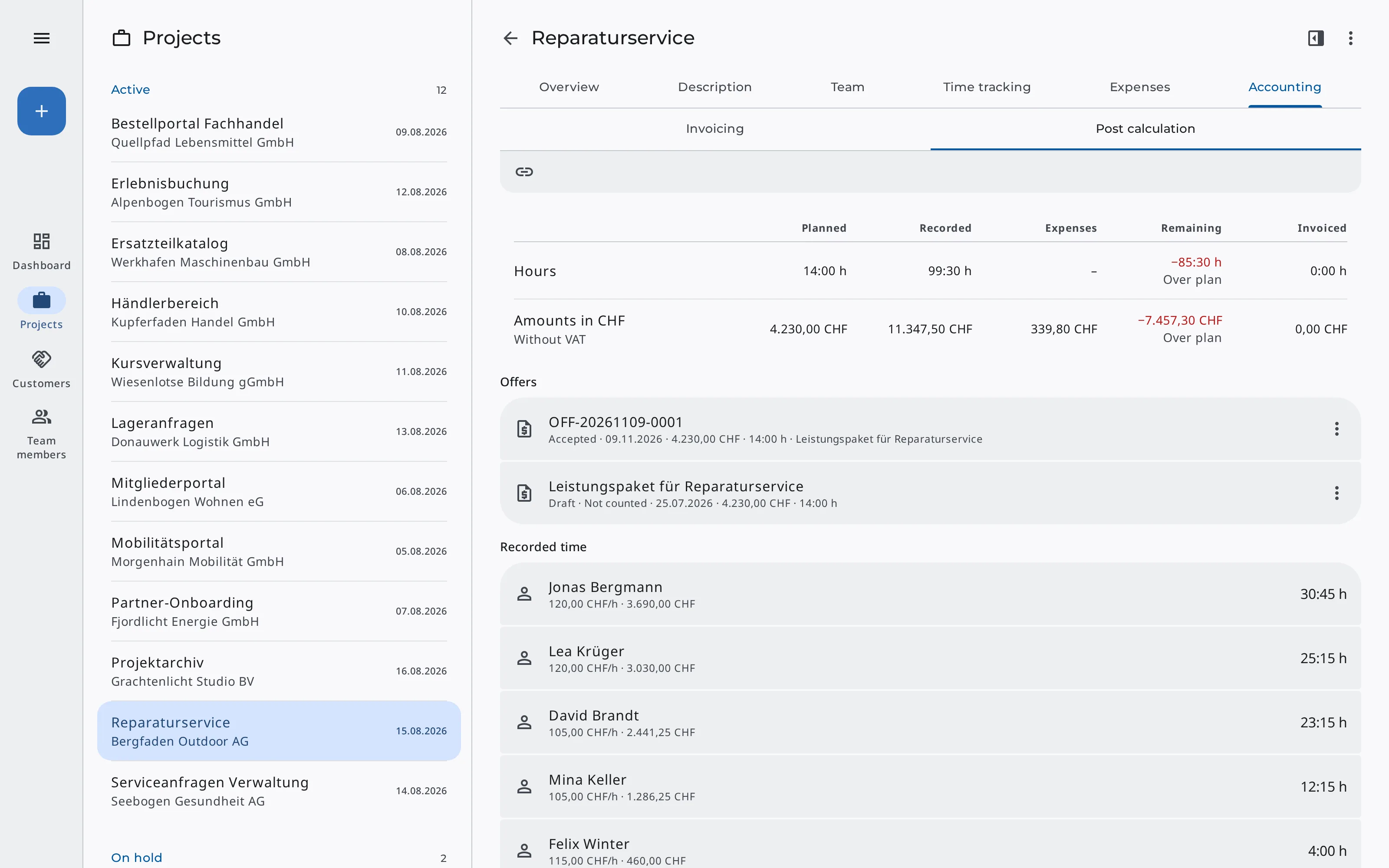
Did the job pay off? The post calculation compares the project's accepted quotes with the recorded time at its hourly rates, the expenses, and the issued invoices. If the effort exceeds the quote, Erdikon marks the remainder as «Over plan».
It compares hours with the quote lines charged by the hour. All amounts are net and per currency. If a customer accepts by phone or email, you mark the quote as accepted in Invoicing so that it counts in the post calculation. If an accepted quote has no project yet, you create it there with «Create project».
The post calculation shows
- Planned in the quote
- Recorded time at hourly rates
- Expenses
- Remaining or over plan
- Invoiced
Work with AI assistants
Through the Model Context Protocol (MCP), AI assistants also work with your projects. They create projects, record expenses, read the post calculation, and create invoices from time and expenses.
The assistants always act with your permissions. The connection is included in the Pro and Unlimited plans.
Example requests
«Create the invoice for the time and expenses of the Website Relaunch project in October.»
«How does the Dealer Portal project compare with its quote?»
You can find out what else AI assistants can do in Erdikon on the page «AI Assistants».
Frequently asked questions
Do I need Project Time to bill projects?
Not for expenses. Without Project Time, Erdikon bills a project's expenses on their own. To bill hours, your team records its time in Project Time.
Who can see the hourly rates?
Only people who can edit projects see and change the rates. They're also the only ones who see the amounts Erdikon calculates from them. On an invoice, the rates appear as the price of its lines.
What happens if I cancel an invoice?
If you cancel an issued invoice with a credit note, Erdikon releases its time and expenses automatically, and you can bill them again. For a draft, you release them yourself.
Can I work with several currencies?
Yes. Hourly rates and expenses each have their own currency, and the post calculation shows each currency separately. An invoice, however, has only one currency, so you bill time and expenses in different currencies in separate periods.
Part of the Erdikon platform
Project Time
Team members record their time on their projects, by timer or after the fact.
Learn moreInvoicing
You assign quotes and invoices to a project. Invoices from time and expenses are sent like any other.
Learn moreMaster Data
Customers, contacts, and team members come from the shared master data.
Learn moreExpenses
You record the project's expenses with receipt, VAT, and category and see what is still unpaid.
Learn more