Audit Log
See who changed what in the audit log
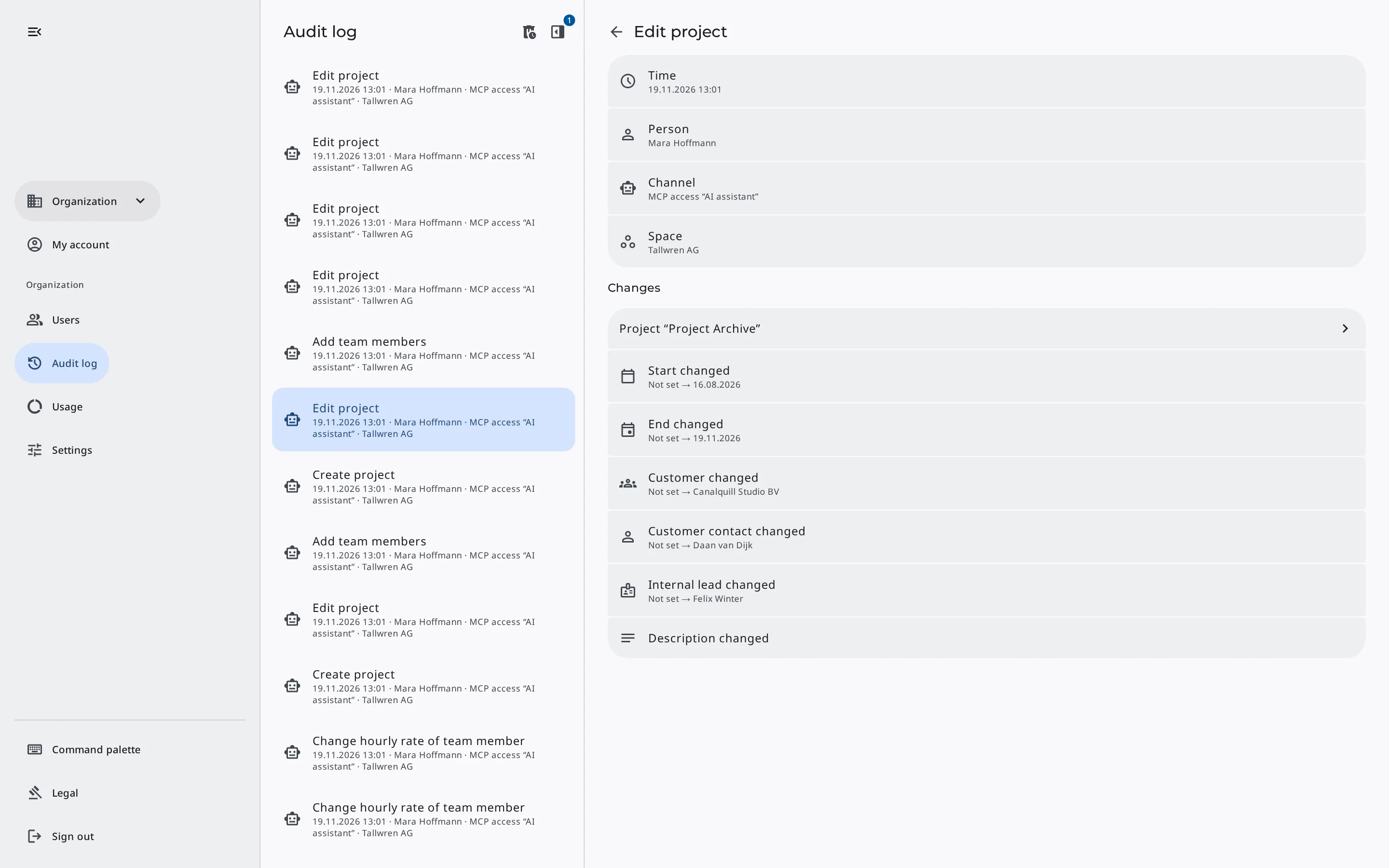
The audit log shows who changed what in your organization, when, and in which Space. For each change, you also see whether it came from the browser, an AI assistant's MCP credentials, or a scheduled run such as a recurring invoice.
Free for up to two users. No credit card required.
Review changes by AI assistants
When an AI assistant works through MCP with write access, you want to know what it actually did. The audit log records each of its steps as a separate entry, such as «Add line item» or «Record payment», and names the MCP credentials it used.
Filter by those credentials to see only their entries. At the end of the day, for example, you can check which invoice drafts the assistant created and which payments it recorded.
What each entry records
- Time & person
- Action, such as «Issue invoice»
- Browser, MCP credentials, or scheduled run
- Space or whole organization
- Changed records
Filter entries by person, Space & period
By person
Check what a team member changed, for example during onboarding.
By channel & MCP credentials
Separate changes made in the browser from those made through MCP and from scheduled runs such as recurring invoices and recurring expenses.
By Space
Show only the entries of one Space. Changes to users or Spaces belong to no Space, because they affect the whole organization.
By period
Limit the list to today, the last 7 days, or the last 30 days.
Changed records & their history
When you open an entry, you see which records the action changed and how. The changes appear just as they do in the record's history, and one click opens the invoice, expense, or project, for example.
For records without their own history, such as snippets or prices, the entry only shows the action. The audit log itself stores no inputs such as email texts, notes, or files.
With detailed changes
- Quotes, invoices & credit notes
- Recurring invoices
- Expenses
- Projects
- Master data & legal documents
Retention & unchangeable entries
Completed actions only
Erdikon writes the entry together with the change. If an action is canceled or fails, no entry is created.
Cannot be changed
Nobody can edit entries or delete them by hand, not even the owners.
Retention of your choice
The owners decide how long Erdikon keeps entries, from 30 days to 10 years.
Owners only
Only the organization's owners see the audit log. It shows them the entries of all Spaces.
Frequently asked questions
Is the audit log included in the Free plan?
Yes, in all plans, in the Erdikon cloud and on your own infrastructure. Because the Free plan doesn't include MCP, it has no entries from MCP credentials.
Does the audit log record who viewed something?
No, only changes. Queries and read access don't appear, not even those of AI assistants.
Under which name do an AI assistant's changes appear?
Under the person who owns the MCP credentials, together with the name of the credentials. If you rename the credentials, earlier entries show the new name too.
Does the audit log show when customers accept a quote?
No. The audit log shows changes by people in your organization. What customers do through their personal link appears in the quote's history.
What happens to older entries?
Erdikon deletes them automatically once they are older than the chosen retention, after 90 days by default. The history of the changed records stays.
In all applications
The audit log records changes from all Erdikon applications and modules.
Invoicing
See who changed a quote, issued an invoice, or recorded a payment.
Learn moreExpenses
See whether a person or an AI assistant recorded expenses, receipts, and payments.
Learn moreProjects
See who created a project or changed its team.
Learn moreProject Time
See who started timers or edited time entries, and when.
Learn moreMaster Data
Trace who changed organizations, people, and products.
Learn moreSnippets
See who created, changed, or deleted snippets.
Learn more